
Restrict access to users with active tasks only - reduce your attack surface automatically
Requires Crowdin account
JIT Access

This app enables Crowdin Enterprise administrators to implement Just-In-Time (JIT) access control for their organization. When enabled, users can only access the organization when they have active tasks assigned to them. This significantly reduces the attack surface by ensuring users only have access when they have actual work to do.
Why use JIT Access?
The more people who have access to your Crowdin organization, the larger your attack surface becomes. Every user account represents a potential vulnerability—if any single user's device gets compromised by malware, attackers could gain access to all the data that user can see.
Traditional localization workflows often grant linguists permanent access to the organization, even when they have no active work. This creates unnecessary risk: a translator who completed their last task months ago still has full access to your translation data, files, and potentially sensitive content.
JIT Access solves this problem by implementing the principle of least privilege: users can only access Crowdin when they have work assigned to them.
Key Benefits:
- Reduced Attack Surface: Limits exposure by restricting access to users with active work only.
- Principle of Least Privilege: Users get access exactly when they need it—not before, not after.
- Automatic Access Revocation: When tasks are completed, access is automatically restricted without admin intervention.
- Audit-Friendly: Clear access control based on documented task assignments.
- Flexible Grace Periods: Configure how long users retain access after their last task is completed.
Important Considerations
This app may cause workflow friction. If a linguist is asked to do work in Crowdin, they will not be able to log in until a task is created and assigned to them. Make sure your project managers understand this workflow before enabling the app.
For maximum security effectiveness, configure your organization's session timeout to force users to re-login frequently. This ensures JIT Access checks are performed regularly, not just on initial login.
Recommended: Zero Trust Configuration
For maximum security, we strongly recommend combining this app with Crowdin's native Task-Based Access Control.
While the JIT Access app controls entry (blocking login if no tasks exist), Task-Based Access controls visibility (limiting users to specific content).
Access Rules
| User Type | Access Behavior |
|---|---|
| Organization Owners & Admins | Always have access (never blocked) |
| Whitelisted Users | Always have access (bypass task checks) |
| Managers | Should be whitelisted, as managers typically don't have tasks assigned to them |
| Linguists & Contributors | Must have open tasks to access the organization |
How It Works
1. Installation
Install the app and ensure it is available to admins only (do not grant access to all organization members).
2. Configuration
Open Organization Settings and locate the app in the left-hand menu JIT Access.
- Enable JIT Access Control for your organization.
- Select an access policy that determines how strictly access is controlled.
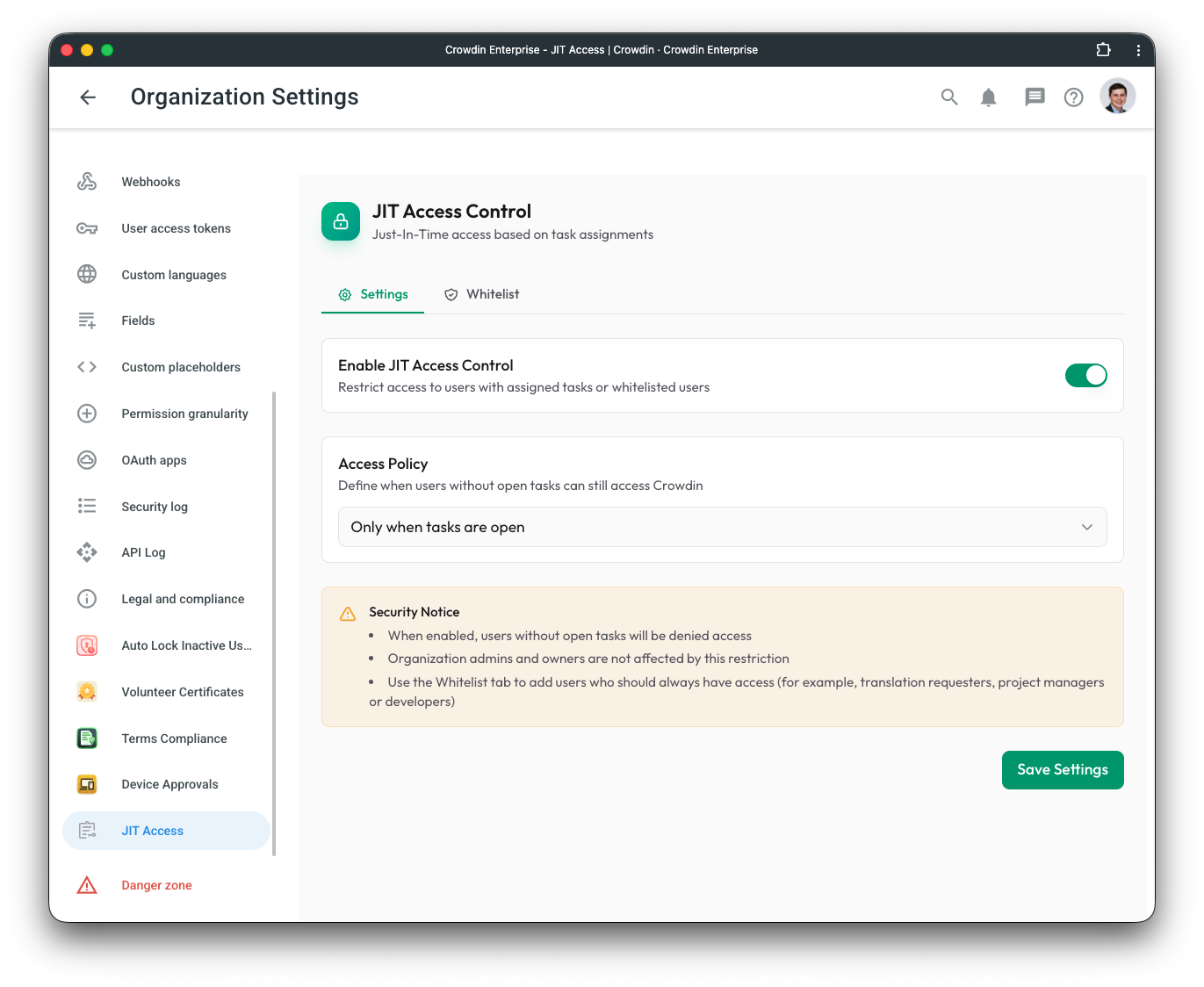
Access Policies:
| Policy | Description |
|---|---|
| Open tasks only | Users can only access when they have tasks in "To Do" or "In Progress" status |
| 1 day grace | Access allowed up to 1 day after last task was closed |
| 2 days grace | Access allowed up to 2 days after last task was closed |
| 3 days grace | Access allowed up to 3 days after last task was closed |
| 1 week grace | Access allowed up to 1 week after last task was closed |
| 2 weeks grace | Access allowed up to 2 weeks after last task was closed |
| 1 month grace | Access allowed up to 1 month after last task was closed |
| 2 months grace | Access allowed up to 2 months after last task was closed |
Note: Once enabled, all existing and new users (excluding admins and whitelisted users) will be denied access if they don't have open tasks when they try to log in.
3. Whitelist Configuration
Navigate to the Whitelist tab to add users or email patterns that should always have access:
User Whitelist:
- Select specific users who should bypass task requirements.
- Ideal for project managers, translation requesters, developers, or permanent staff who don't receive task assignments.
Email Pattern Whitelist:
- Use patterns like
@company.comto whitelist all employees from your domain. - Supports wildcards for flexible matching (e.g.,
*@contractor.io). - Useful when you want to give unrestricted access to all internal staff while restricting external vendors.
4. User Experience
When a user without open tasks attempts to access the organization:
- Access Denied: They see an error message explaining that task-based access control is enabled.
- Clear Guidance: The message instructs them to contact their project manager to get a task assigned.
- Automatic Access: Once a task is assigned, they can log in immediately—no approval workflow needed.
If a grace period policy is configured, the error message will indicate how many days have passed since their last task was completed.
5. Best Practices for Admins
To maximize the security benefits of JIT Access:
Use Task-Based Access Control: As mentioned above, invite users without roles and use tasks to grant content access. This ensures that even when a user is allowed in, they cannot browse the entire project.
Configure Session Timeout: Set a reasonable session timeout (e.g., 8 hours or 1 day) in your organization settings. This ensures JIT Access checks happen frequently.
Whitelist Project Managers: Managers typically don't have tasks assigned to them but need constant access. Add them to the whitelist.
Consider Grace Periods: If your workflow involves gaps between task assignments, use a grace period policy to avoid disrupting active collaborators.
Communicate the Change: Before enabling, inform your team that they'll need active task assignments to access the organization.
Important Notes
Admins are Exempt: Organization administrators and owners are never blocked by JIT Access to ensure they can always manage the system.
No User Interaction Required: Unlike approval-based workflows, JIT Access works automatically based on task assignments. Users don't need to request access—they either have tasks or they don't.
Task Status Matters: Only tasks with "To Do" or "In Progress" status count as open tasks. Completed or closed tasks don't grant access (unless within the grace period).
Whitelist Takes Priority: Whitelisted users and email patterns are checked before task verification, ensuring designated users are never inconvenienced.


Crowdin is a platform that helps you manage and translate content into different languages. Integrate Crowdin with your repo, CMS, or other systems. Source content is always up to date for your translators, and translated content is returned automatically.
Learn More- —Crowdin Enterprise
Released on Dec 10, 2025
Updated on Dec 18, 2025
Published by Awesome Crowdin
Identifier:jit-access