
Requires Crowdin account
Prompt Routing for Crowdin AI

A routing layer between Crowdin and your AI provider that dynamically selects prompts based on target language. Configure prompt-to-language mappings once, and all projects workflows will automatically use the right prompts.
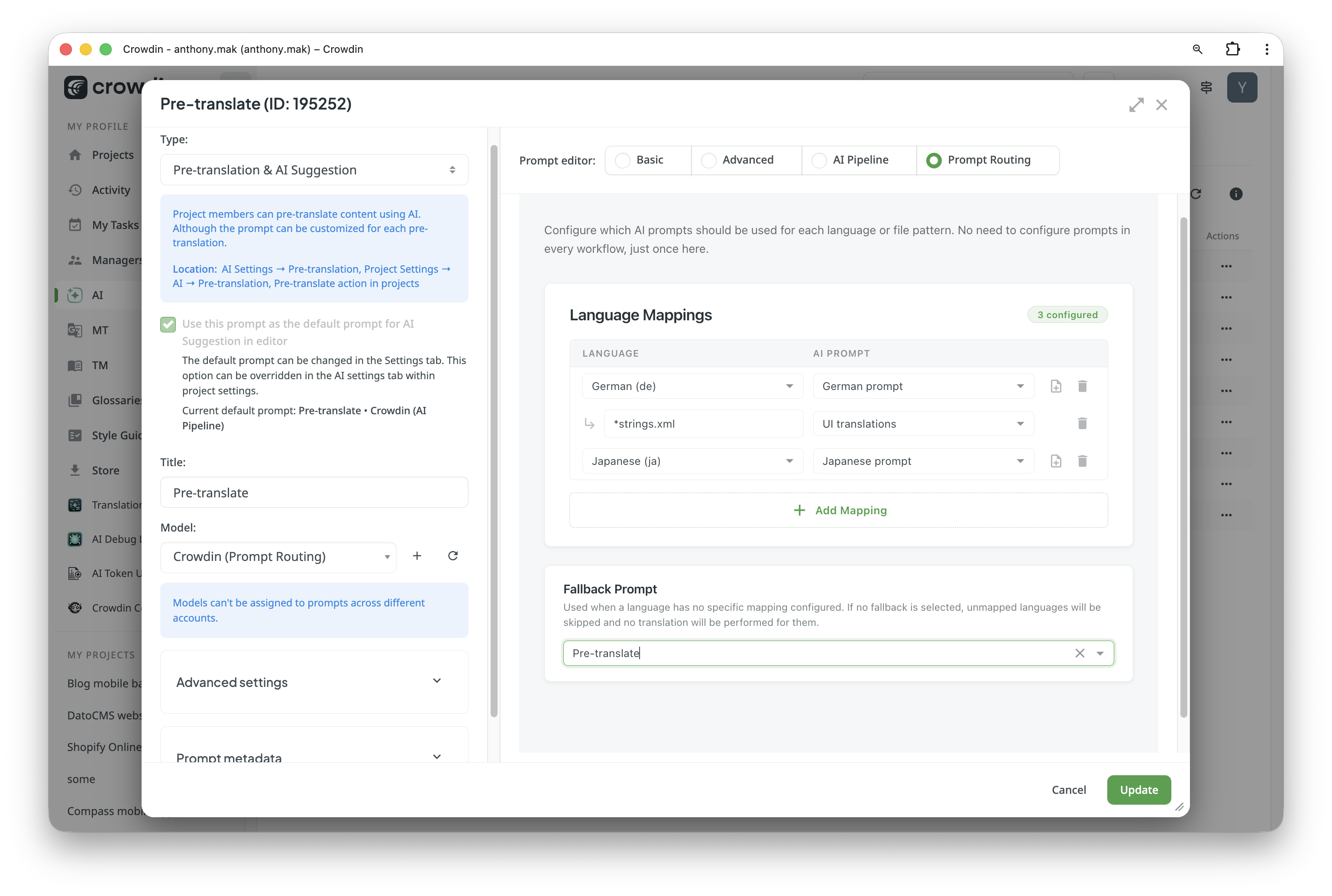
Instead of applying a single "one-size-fits-all" prompt to your entire project, Prompt Routing automatically ensures that each target language receives its specific stylistic nuances and each file format follows its unique structural requirements.
Prompt Routing doesn't perform translations itself. You need at least one AI provider configured in your Crowdin organization.
Features at glance
- Centralized logic - manage complex AI behaviors across multiple languages and file types from a single configuration.
- Enhanced quality - deliver higher accuracy by providing the AI with instructions tailored to the specific type of the content.
- Simplified workflows - eliminate the need to manually assign different prompts for different project components.
How it works
- Crowdin sends a translation request to Prompt Routing
- The system looks up the prompt mapped to the target language
- The request is forwarded to the actual AI provider with the selected prompt
- The translation result is returned back to Crowdin
How to set up
- Install the app: Once installed, the routing engine integrates into your existing AI settings.
- Navigate to AI > Prompts: Create a new prompt or open an existing one.
- Select Mode: In the Prompt Editor selection at the top, choose the Prompt Routing mode.
- Configure Mappings: Match specific languages or file patterns to their respective AI prompts.
- Set a Fallback: Choose a default prompt to handle any content that doesn't match your specific rules.
File Pattern Examples
Use flexible glob patterns to target specific platforms and file types:
- Android:
**/*strings.xml- targets all XML resource files in any directory. - iOS:
**/*.strings- matches all localized string files for iOS/macOS. - Web/Data:
**/*.json- routes all JSON data or localization files. - Web/Content:
**/*.html- ensures specific instructions for HTML structure and tags. - Documentation:
docs/**/*.md- applies a specific prompt to all Markdown files within the docs folder. - Multiple Formats:
**/*.{json,yaml,yml}- targets various configuration formats in one rule.
Technical Note
The app supports advanced matching features:
- Wildcards:
*(any character),**(any directory). - Extglobs:
@(a|b)(matches exactly one),!(a|b)(matches anything except). - Braces:
{a,b}for multiple options,{1..5}for numeric ranges/diapasons (e.g.,v{1..3}/*.json). - Path Normalization: Patterns are matched against both the full path and the filename for maximum flexibility.


Crowdin is a platform that helps you manage and translate content into different languages. Integrate Crowdin with your repo, CMS, or other systems. Source content is always up to date for your translators, and translated content is returned automatically.
Learn More- —crowdin.com
- —Crowdin Enterprise
Released on Mar 23, 2026
Updated on Mar 23, 2026
Published by Crowdin
Identifier:prompt-routing