
Requires Crowdin account
Cursor brings source-code context to translators inside the Crowdin Editor. When a translator isn't sure what a string means or where it appears, they open the Cursor panel and click Find context — a Cursor cloud agent reads the connected repository and returns a short, plain-language explanation of how that string is used. Translators get the context they need without being given access to the codebase or to an open AI chat.
What it does

For a selected string, the app sends its key, source text, and any existing context to a Cursor Cloud Agent, which investigates the project's repository and explains:
- where the user sees the string (which screen, page, or feature);
- what kind of element it is (button, heading, error message, etc.);
- when it appears (e.g. after submitting a form, when a payment fails).
The answer is written for a non-technical reader — no file names, no code, no framework terms.
How it works
Project manager  ──▶  Tools → Cursor          Translator  ──▶  Cursor panel
                       · Cursor API key                          · Find context
                       · Repository                              · reads the explanation
The agent runs read-only: it investigates the repository to understand the string but never modifies, creates, or commits code. Only the agent's text answer comes back to Crowdin.
Setup (project manager)
- Install the app for your project or organization.
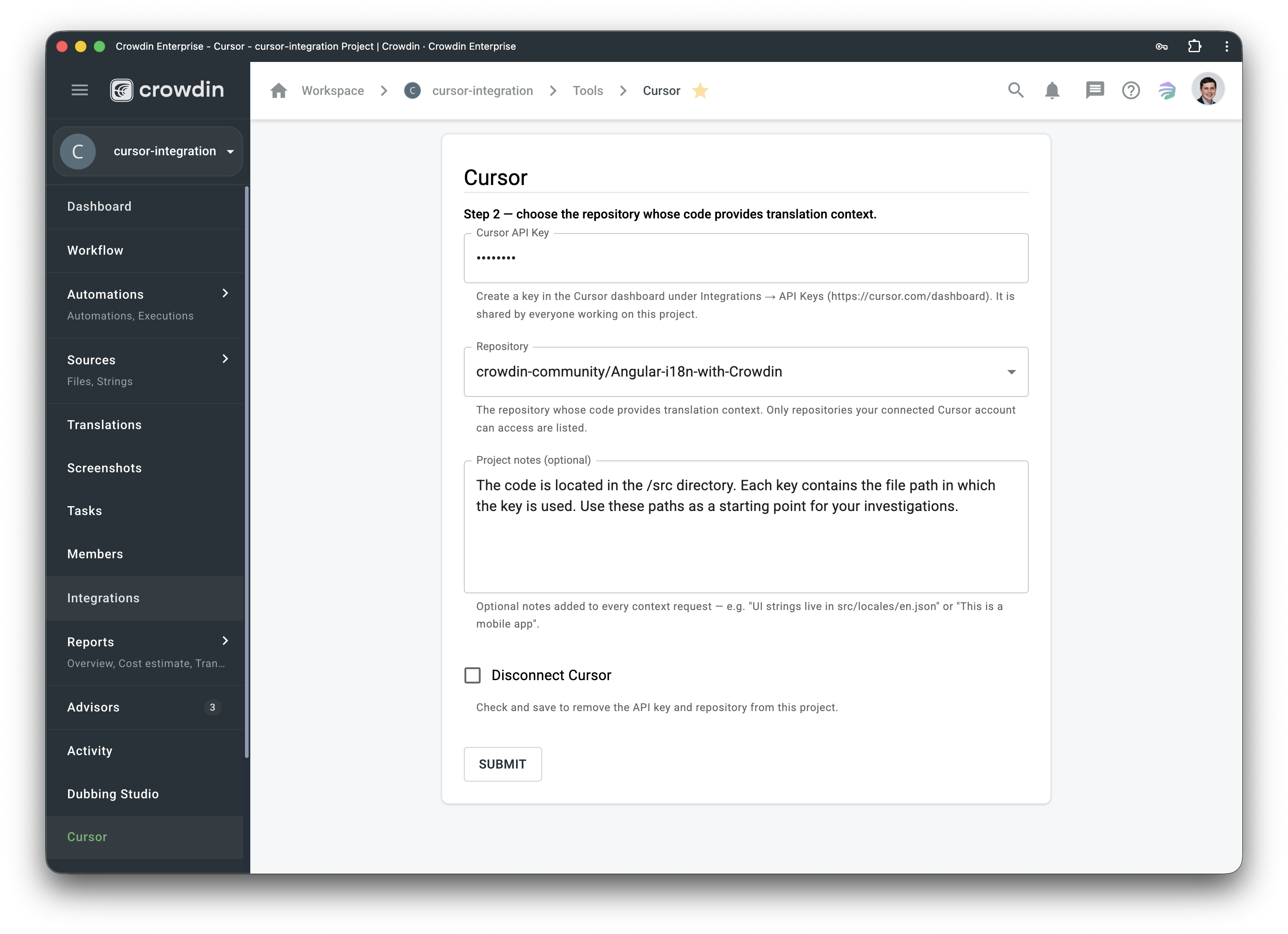
- Open Tools → Cursor in your project.
- Step 1 — paste a Cursor API key (Cursor dashboard → Integrations → API Keys) and save. The key is validated and the account's repositories are loaded.
- Step 2 — choose the repository whose code provides the context. Only repositories the connected Cursor account can access are listed.
- (Optional) Add project notes that are included with every request — e.g. where UI strings live, or that this is a mobile app.
The API key is stored server-side, shared by everyone working on the project, and never exposed to the browser or to translators.
Using it in the editor
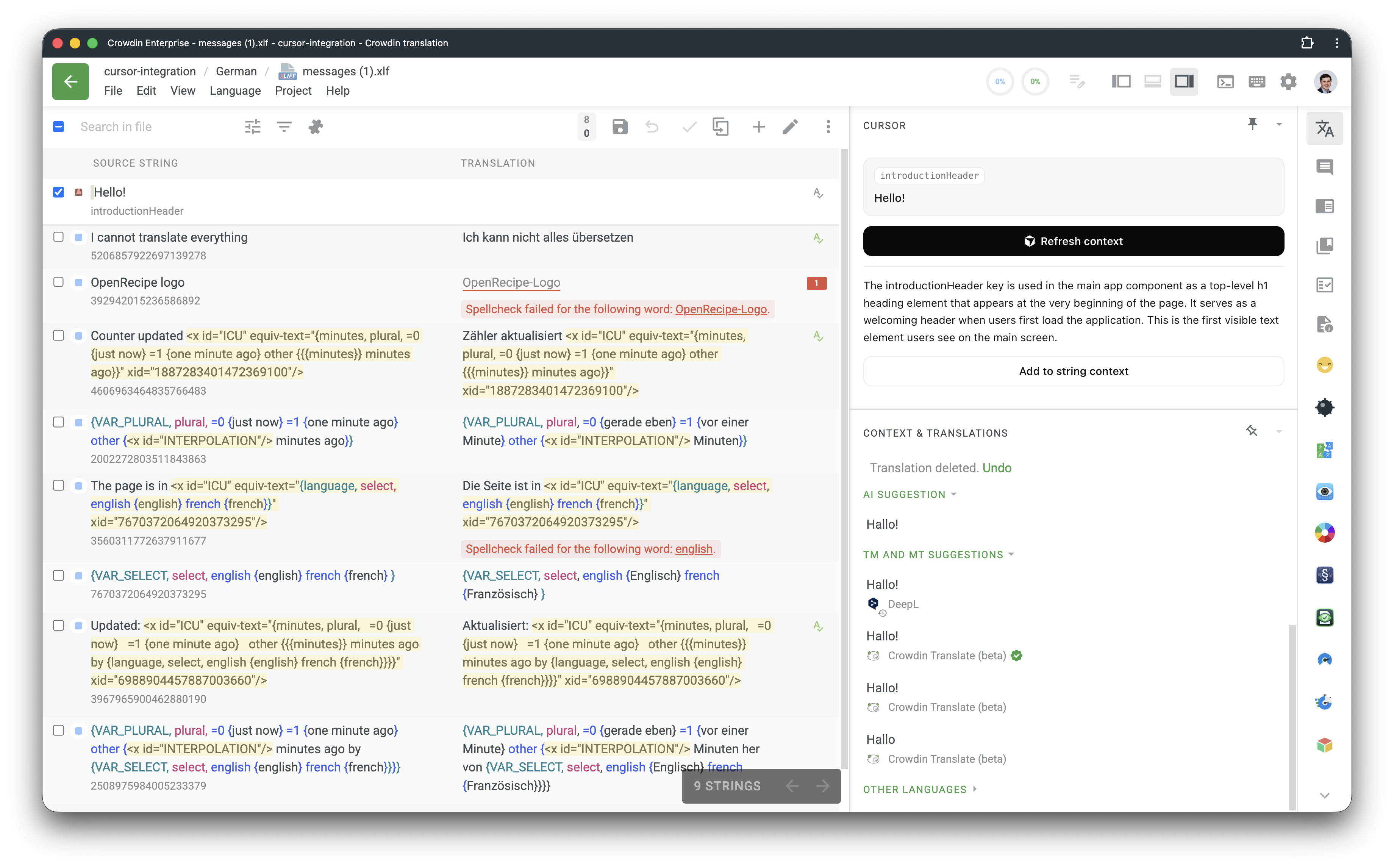
In Translate or Review mode, open the Cursor tab in the right panel, select a string, and click Find context. The explanation appears below the button and is reused by everyone on the project.
Project managers additionally see Add to string context, which writes the explanation directly into the Crowdin string (preserving any manually written context) so it shows up natively for every translator, even those who don't open the Cursor panel.
Access and security
Translators can only request context — they cannot write or change the prompt. It's fixed by the app, and the string data it includes is treated strictly as untrusted input and length-capped, so source strings can't be used to redirect the agent.
Two things to be aware of and accept before enabling broad access:
- The explanations are generated from your source code by a Cursor agent that can read the connected repository. Whoever can open the Cursor panel sees AI-written descriptions derived from that code.
- As with any AI output, answers are best-effort and not guaranteed to be accurate.
When you install the app, you choose who can access it — restrict it to managers only, or open it to all project members, including translators. Choose based on how sensitive the connected repository is: managers-only keeps generated context within the team that already has code access, while opening it to translators gives everyone self-service context at the cost of exposing code-derived descriptions more widely.


Crowdin is a platform that helps you manage and translate content into different languages. Integrate Crowdin with your repo, CMS, or other systems. Source content is always up to date for your translators, and translated content is returned automatically.
Learn More- —crowdin.com
- —Crowdin Enterprise
Released on Jun 29, 2026
Updated on Jul 3, 2026
Published by Awesome Crowdin
Identifier:cursor