Streamline the localization with a machine translation engine that helps translators work faster and better.
Google Translate for Crowdin

Bring the power of Google’s neural machine translation directly into your Crowdin projects. By connecting the Google Cloud Translation API, you can provide instant translation suggestions to your linguists in the Editor or leverage full automation via auto-translation to speed up your localization workflows.
Key Features:
- Support for over 130 languages with high-quality neural translations.
- Machine translation results are displayed immediately in the Editor.
- Fully compatible with Crowdin's auto-translation.
How to configure Google Translate in Crowdin
Google Translate API is a part of the Google Cloud Platform (GCP). To connect it to Crowdin, you will need a Google Cloud account with an active billing profile to generate an API key.
Step 1: Google Cloud Platform Setup
Create or select a project: Go to the Google Cloud Console and create a new project (or select an existing one).
Enable Billing: Ensure that your project has an active billing account linked to it (Google requires this for all Translation API requests).
Enable Cloud Translation API:
- In the top search bar, search for "Cloud Translation API".
- Click on the service and click the Enable button.
Generate your API Key:
- In the left-hand navigation menu of GCP, go to APIs & Services > Credentials.
- Click + Create Credentials at the top and select API key.
- Copy the generated text string (your API key).
Step 2: Integration in Crowdin
Depending on your account type (Crowdin or Crowdin Enterprise), follow these steps to connect the key:
Navigate to Machine Translation settings:
- In your organization workspace, go to Machine translation in the left side menu.
- Or, if you are using a personal profile, go to the MT section in the left side menu.
Add Google Translate: Click to add a new engine and choose Google Translate from the list.
Enter Credentials: Paste the copied API Key from your Google Cloud Console into the corresponding field.
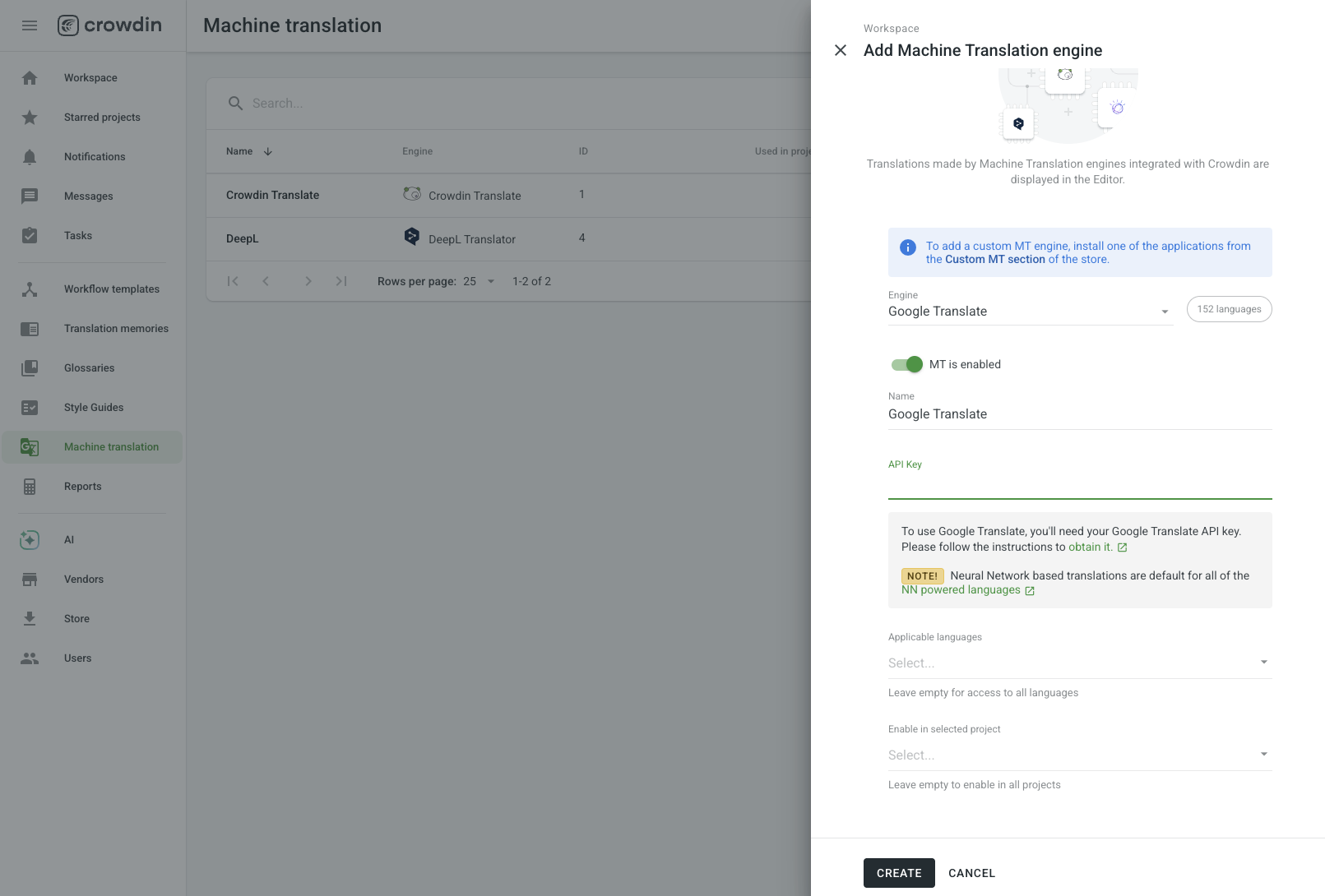
4. Save your changes: Click Create to activate the integration.
This standard integration connects via an API key. If you need advanced corporate features like custom glossaries or Translation Memory integration using Google's v3 API models, consider using the Google Translate LLM app, which requires a Service Account JSON file instead of an API key.
Enabling Translations in Projects
By default, machine translations are enabled for each project. To ensure your translators see Google Translate suggestions within the Crowdin Editor, verify that the Show machine translation suggestions option is enabled in your specific project settings.


Crowdin is a platform that helps you manage and translate content into different languages. Integrate Crowdin with your repo, CMS, or other systems. Source content is always up to date for your translators, and translated content is returned automatically.
Learn More- —Crowdin Enterprise
- —crowdin.com
Released on Jan 11, 2022
Updated on Jun 22, 2026
Published by Crowdin
Identifier:google-translate